Transcribe the lesson
Turn lectures and study sessions into course material you can review, search, and connect to the right topics.



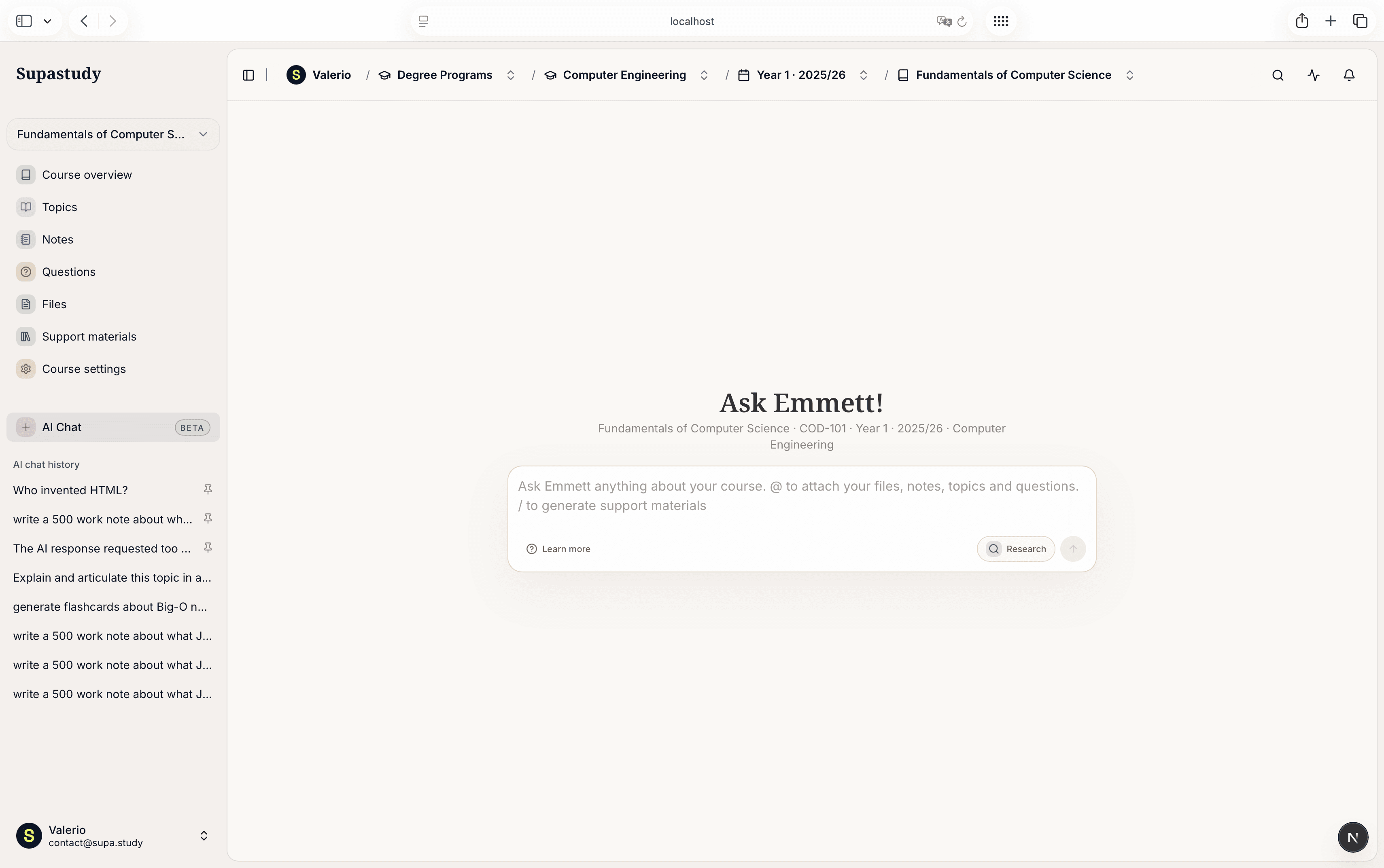
Supastudy turns each course into a structured workspace for topics, notes, questions, files, and classmates. Transcribe lessons, search your materials, and keep every resource attached to the right part of the syllabus. Then use Emmett to turn that context into answers, study sheets, quizzes, flashcards, mindmaps, and exam prep plans.
Capture lessons, organize the course, search your notes and files, then ask Emmett to elaborate from the same workspace.
Turn lectures and study sessions into course material you can review, search, and connect to the right topics.
Attach notes, PDFs, slides, open questions, and generated materials to the right course topic.
Find what you need across notes and files, then bring the relevant material into the next study question.
Use Emmett to explain concepts, answer questions, elaborate from your files, and create support materials for revision.
Use Supastudy AI to move from raw lessons and scattered materials to explanations, answers, and focused practice without leaving your course workspace.
|
Search across course files, notes, topics, and questions, then ask Emmett for explanations, summaries, next steps, or clarification grounded in your own materials.
|
Create quizzes, flashcards, summaries, mindmaps, glossaries, study sheets, formula sheets, worked examples, timelines, and exam prep plans from the course context.
|
Turn useful Emmett answers into course notes, files, or answers to existing questions so knowledge becomes part of the shared course structure.
Supastudy supports solo preparation, shared courses, and AI-assisted revision without breaking the structure of the course.

“Supastudy gave our group one place for notes, files, open questions, and AI-generated practice. We stopped losing context in chat.”
Challenge
Our materials were split between folders, messages, PDFs, and personal notes, so nobody knew what was complete before the exam.
Solution
We mapped the syllabus into topics, linked every resource, and used AI to generate quizzes and study sheets from the same course context.
Susan L., Biochemistry I

“Emmett turned our uploaded notes and files into practice questions and an exam prep plan we could all review together.”
Challenge
We had strong materials, but revision was passive: rereading PDFs and asking the same questions in different chats.
Solution
Supastudy connected questions, topics, and files, then AI generated practice sets and explanations tied to the course.
Mark G., Algorithms course

“I study alone during the week, then share the same course space with classmates before the exam. AI helps fill the gaps before we meet.”
Challenge
Solo prep made it hard to know which topics were weak and which questions still needed clear answers.
Solution
Topic progress, linked files, and AI study sheets made weak spots visible before collaborative review sessions.
Carol H., Constitutional Law
Generic tools are flexible, but they are not designed around courses, topics, and exam prep.
Students use Supastudy to organize courses and materials, then turn notes, files, and questions into quizzes, flashcards, study sheets, and exam prep plans with AI.
“Supastudy finally gave our study group one place for notes, files, and open questions. We stopped wasting time digging through chat threads.”
“I built my whole exam plan inside topic trees and linked every resource to the right chapter. Revision week felt much more under control.”
“The shared course workspace made it obvious what still needed notes and what had already been covered. That clarity saved us a lot of stress.”
“Supastudy finally gave our study group one place for notes, files, and open questions. We stopped wasting time digging through chat threads.”
“I built my whole exam plan inside topic trees and linked every resource to the right chapter. Revision week felt much more under control.”
“The shared course workspace made it obvious what still needed notes and what had already been covered. That clarity saved us a lot of stress.”
“I used to keep PDFs, summaries, and questions in different apps. Now everything lives in the same place and is attached to the right topic.”
“Emmett takes our notes and prepares targeted quizzes before the revision group. We arrive with the right questions instead of rereading everything.”
“The AI-generated flashcards come from the real course files, not generic examples. They are immediately useful for memorizing definitions, formulas, and key steps.”
“I used to keep PDFs, summaries, and questions in different apps. Now everything lives in the same place and is attached to the right topic.”
“Emmett takes our notes and prepares targeted quizzes before the revision group. We arrive with the right questions instead of rereading everything.”
“The AI-generated flashcards come from the real course files, not generic examples. They are immediately useful for memorizing definitions, formulas, and key steps.”
“Our class finally has a clean way to share lecture slides and tag them to the chapters they belong to. It is simple and actually sticks.”
“I uploaded the slides and asked for an exam prep plan. Supastudy split the sessions by topic and showed us what to review together.”
“When an Emmett answer was good, I saved it straight back into the course as a note or material. The AI did not stay in a separate chat from the rest of my study.”
“Our class finally has a clean way to share lecture slides and tag them to the chapters they belong to. It is simple and actually sticks.”
“I uploaded the slides and asked for an exam prep plan. Supastudy split the sessions by topic and showed us what to review together.”
“When an Emmett answer was good, I saved it straight back into the course as a note or material. The AI did not stay in a separate chat from the rest of my study.”
Learn how Supastudy organizes course materials, supports study groups, and uses AI to turn course context into answers, quizzes, flashcards, mindmaps, and exam prep plans.
Supastudy helps you organize study material from the top down: degree program, year, course, and topic. That structure makes it easier to keep notes, files, and questions attached to the right part of the syllabus.
Each course brings your notes, files, and Q&A into one place, so lecture material, revision notes, and open questions stay together while you study.
You can use Supastudy on your own for course planning, notes, files, and exam prep. Shared courses are optional and become useful when you want to study with classmates in the same course space.
Yes. You can track course status, exam date, and exam grade privately. That personal progress data is never shared with other members.
Editing depends on the role. Owners keep full control, moderators can help manage members and invite links, members can add and edit shared course content, and viewers can only read and download materials.
Emmett can answer questions, explain concepts, summarize material, suggest next steps, and help you understand the course using the notes, topics, questions, and files you attach or mention.
You can mention course topics, notes, questions, and files so the AI response is grounded in the right part of your course instead of a generic prompt.
Yes. Supastudy AI can generate quizzes, flashcards, mindmaps, glossaries, study sheets, formula sheets, worked examples, timelines, practice sets, and exam prep plans from your course context.
Yes. Useful AI answers can be saved as course notes, added to existing questions, or stored as files so the knowledge becomes part of your organized course workspace.
No. Supastudy AI is designed to work beside your materials and classmates. It helps turn course context into study assets, but you stay in control of what to trust, save, and share.

Study Planners

Comparisons

Collaboration

Collaboration

Exam Prep



Transcribe lessons, organize notes and files by course, search your materials, and ask Emmett to explain concepts, answer questions, and generate support materials for exam prep.